1. Forward your confirmations
Send any booking email to import@myvoyaij.com, or upload the saved file. Flights, hotels and car hire all work, plus tours on Starter and Pro.
Most planners hand you a blank calendar. Voyaij works the other way round - forward your booking confirmations and the AI reads them, then builds a day-by-day itinerary with cities, nights, and (Starter and Pro) flight connections, weather and conflict checks. A weekend break or a multi-country tour, it's the same.
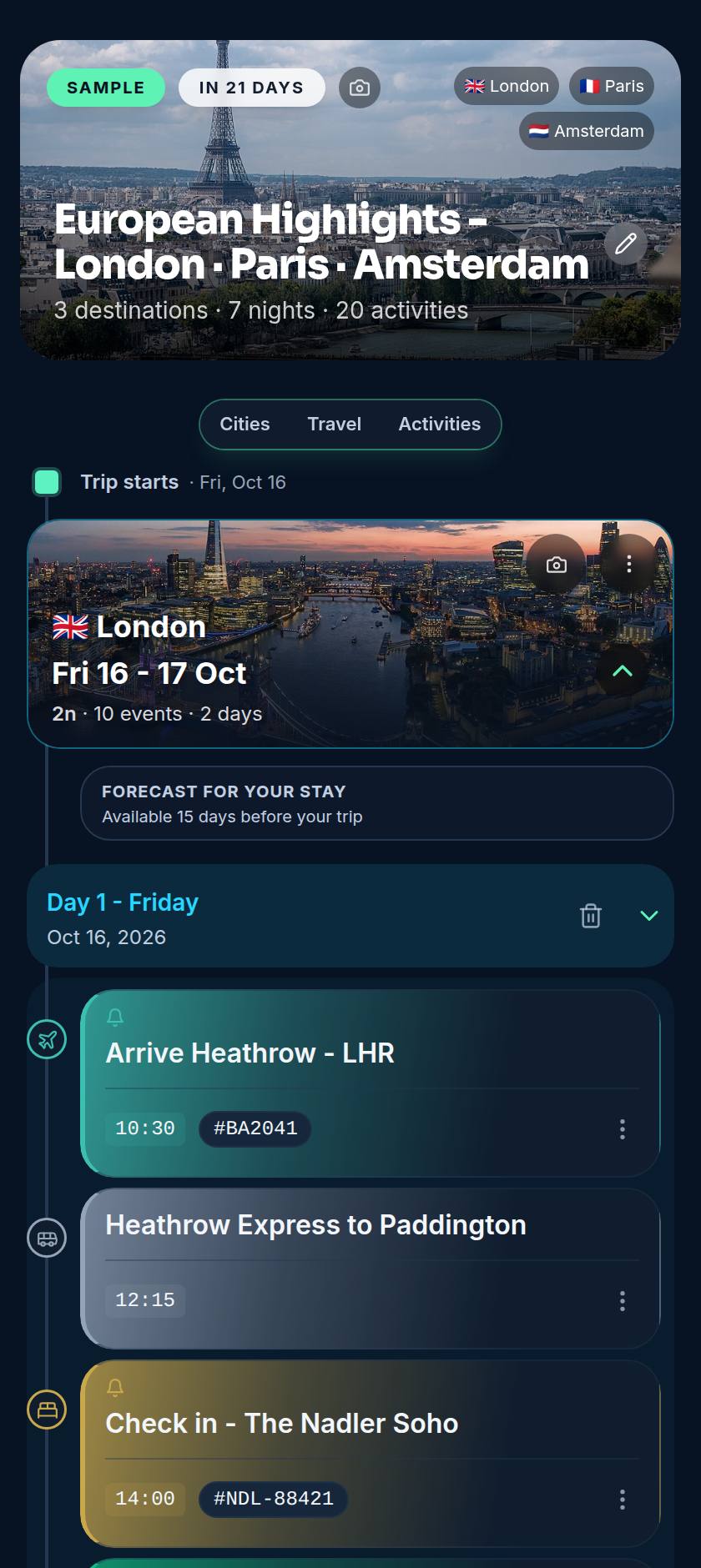
This is a real Voyaij itinerary built from booking confirmations - every event on the right day, with live flight tracking and conflict alerts. It works the same for a weekend away as for a trip across continents. Explore it yourself, no signup needed.
European Highlights - London · Paris · Amsterdam
Arrive Heathrow - LHR
10:30Heathrow Express to Paddington
12:15Check in - The Nadler Soho
14:00Walk the South Bank
17:00+ 3 cities, 6 nights in the full sample
An AI trip planner turns the scattered pieces of a trip into one plan you can follow. Your booking confirmations aren't a plan on their own - they're a dozen emails in different formats, times in different zones, buried in an inbox you have to search every time you want to know what's next.
The real work is reading comprehension, not invention: knowing that "PNR: K2J9QW" is a confirmation number, that 06:55 means a pre-dawn start, and that a Lisbon hotel belongs to the Lisbon leg, not Porto. Voyaij is built around that reading step - you decide what it sees, it does the structuring, and you keep the final say on every detail.
Send any booking email to import@myvoyaij.com, or upload the saved file. Flights, hotels and car hire all work, plus tours on Starter and Pro.
It extracts times, confirmation numbers and locations, then places each event on the right day in the right city, building the cities-and-nights backbone as it goes.
Your trip appears as a clean timeline. Move an activity, add what the AI did not see, or share it with the people you are travelling with.
Airline, flight number, departure and arrival times, and terminals where the confirmation includes them.
Check-in and check-out dates, nights, and the property address so it lands in the right city.
(Starter and Pro) Booked experiences with their date, time and meeting point, slotted onto the matching day.
Pickup and drop-off times and locations, treated as their own events on your timeline.
From those pieces it assembles the structure that turns a list of bookings into a trip: which cities you are in, how many nights in each, and the timeline of every day from arrival to departure.
(Starter and Pro) If two flights leave little room to connect, or a tour starts before you land, Voyaij flags it before it becomes a problem at the gate.
(Starter and Pro) A forecast sits alongside your plan so you can pack and reshuffle outdoor activities with eyes open.
(Starter and Pro) Overlapping bookings, double-booked evenings and missing transport between cities are surfaced as gentle nudges, not buried.
Planning by hand isn't hard, just slow and easy to get wrong: open each email, copy a time, convert the zone, paste an address, repeat until you've lost an evening - and one typo puts you at the airport an hour late. An AI trip planner removes the copying. Times come straight from the source, the structure builds in seconds, and because everything lives in one timeline, changing a booking doesn't leave stale copies behind in a notes app, a group chat and an inbox.
Voyaij does not connect to your mailbox, and it never will. There is no "link your Gmail" step, no IMAP password, no background scanning. You forward exactly the confirmations you want it to read, and nothing else is visible to the app. That keeps a surprise trip a surprise, and it means a shared family inbox does not leak the bookings you have not announced yet.
Once the itinerary is built, fill the open afternoons. Here are popular tours and activities you can book ahead - powered by GetYourGuide.
Forward your flight, hotel and activity confirmations to import@myvoyaij.com and Voyaij does the rest - cities and nights, plus connections, weather and conflict detection (Starter and Pro). Free plan, no credit card.
It can do the heavy lifting. Voyaij reads the flight, hotel and car-hire confirmations you forward (plus tours on Starter and Pro), then builds a structured day-by-day itinerary - cities, nights, arrival and departure times, and the gaps in between. You stay in control: the AI drafts the plan, you tweak it. Think of it as a travel assistant that does the data entry, not a black box that books things without you.
Yes. Voyaij's free plan parses up to 10 booking confirmations a month, stores all your trips, and builds the full itinerary automatically. No credit card to start. Paid plans lift the import limit to 50 (Starter) or 150 (Pro) AI imports a month and unlock all activity types.
No, and that is deliberate. Voyaij never asks for access to your mailbox. You forward the confirmations you want it to read to import@myvoyaij.com, or upload the saved files. Nothing else in your inbox is ever touched, which matters when a trip is a surprise or shares an inbox with someone else.
Flights, hotels and other accommodation, car rentals, and (Starter and Pro) tours and activities are all parsed into structured events. It picks up confirmation numbers, times, terminals where available, and addresses, then places each one on the right day in the right city.
Always. Every event is editable - change a time, move an activity to another day, add something the AI did not see, or remove a duplicate. The AI gives you a strong first draft so you are editing a finished plan instead of starting from a blank page.